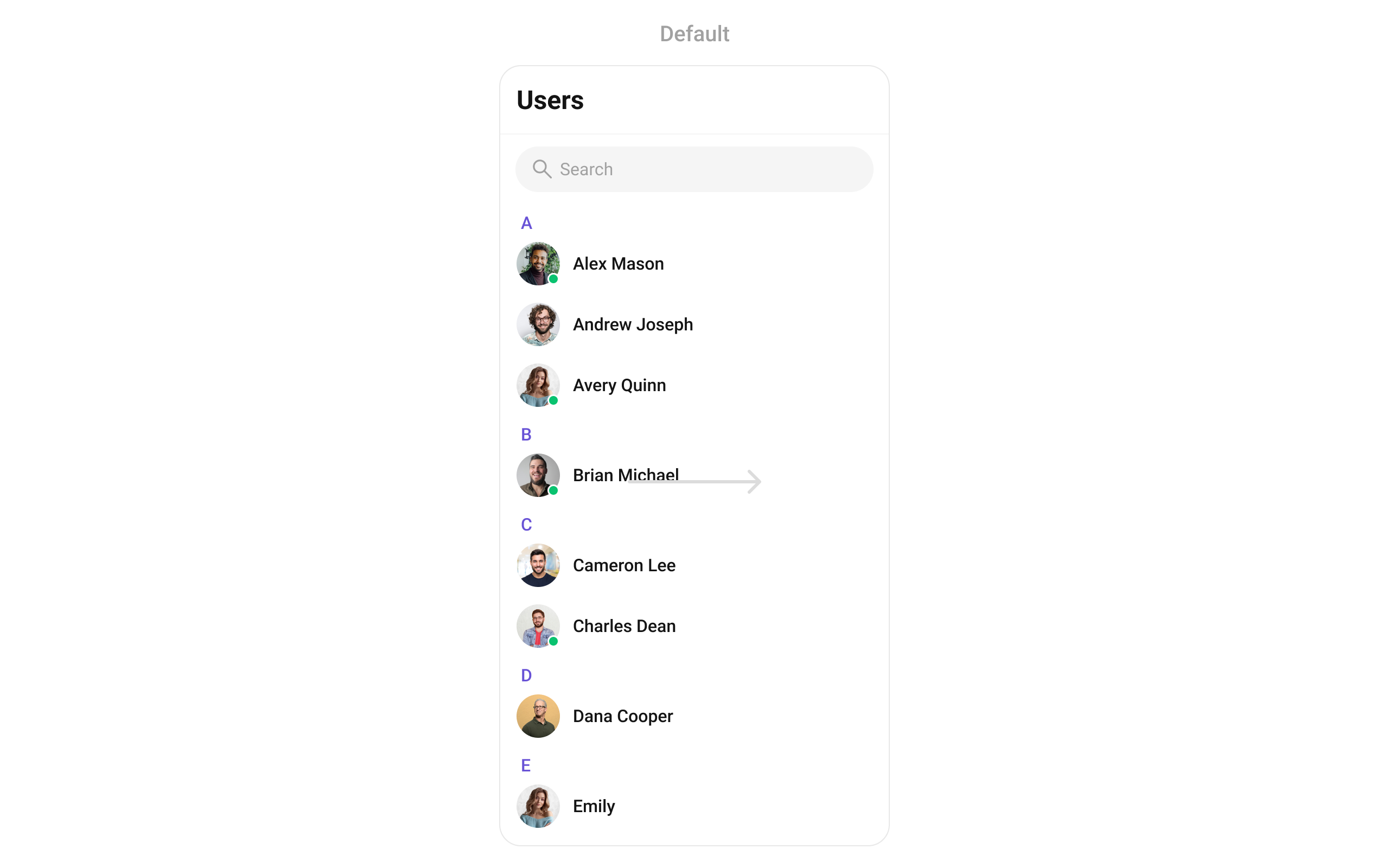
{
  "component": "CometChatUsers",
  "package": "cometchat_chat_uikit",
  "import": "import 'package:cometchat_chat_uikit/cometchat_chat_uikit.dart';",
  "description": "Searchable, scrollable list of all available users with avatar, name, and online/offline status.",
  "primaryOutput": {
    "prop": "onItemTap",
    "type": "Function(BuildContext context, User user)"
  },
  "props": {
    "data": {
      "usersRequestBuilder": {
        "type": "UsersRequestBuilder?",
        "default": "SDK default (30 per page)",
        "note": "Pass the builder, not the result of .build()"
      },
      "usersProtocol": {
        "type": "UsersBuilderProtocol?",
        "default": "null",
        "note": "Custom protocol for fetching users"
      },
      "scrollController": {
        "type": "ScrollController?",
        "default": "null",
        "note": "Custom scroll controller for the list"
      },
      "title": {
        "type": "String?",
        "default": "Users",
        "note": "Title text for the app bar"
      },
      "controllerTag": {
        "type": "String?",
        "default": "null",
        "note": "Tag for controller management"
      },
      "searchPlaceholder": {
        "type": "String?",
        "default": "null",
        "note": "Placeholder text for search input"
      },
      "searchKeyword": {
        "type": "String?",
        "default": "null",
        "note": "Pre-fills search and filters list"
      },
      "height": {
        "type": "double?",
        "default": "null"
      },
      "width": {
        "type": "double?",
        "default": "null"
      }
    },
    "callbacks": {
      "onItemTap": "Function(BuildContext context, User user)?",
      "onItemLongPress": "Function(BuildContext context, User user)?",
      "onSelection": "Function(List<User>? list, BuildContext context)?",
      "onBack": "VoidCallback?",
      "onError": "OnError?",
      "onLoad": "OnLoad<User>?",
      "onEmpty": "OnEmpty?"
    },
    "visibility": {
      "usersStatusVisibility": { "type": "bool?", "default": true },
      "hideAppbar": { "type": "bool?", "default": false },
      "hideSearch": { "type": "bool", "default": false },
      "showBackButton": { "type": "bool", "default": true },
      "stickyHeaderVisibility": { "type": "bool?", "default": false }
    },
    "selection": {
      "selectionMode": {
        "type": "SelectionMode?",
        "values": ["SelectionMode.single", "SelectionMode.multiple", "SelectionMode.none"],
        "default": "null"
      },
      "activateSelection": {
        "type": "ActivateSelection?",
        "values": ["ActivateSelection.onClick", "ActivateSelection.onLongClick"],
        "default": "null"
      }
    },
    "viewSlots": {
      "listItemView": "Widget Function(User user)?",
      "leadingView": "Widget? Function(BuildContext context, User user)?",
      "titleView": "Widget? Function(BuildContext context, User user)?",
      "subtitleView": "Widget? Function(BuildContext context, User user)?",
      "trailingView": "Widget? Function(BuildContext context, User user)?",
      "loadingStateView": "WidgetBuilder?",
      "emptyStateView": "WidgetBuilder?",
      "errorStateView": "WidgetBuilder?",
      "setOptions": "List<CometChatOption>? Function(User, CometChatUsersController, BuildContext)?",
      "addOptions": "List<CometChatOption>? Function(User, CometChatUsersController, BuildContext)?",
      "appBarOptions": "List<Widget> Function(BuildContext context)?"
    },
    "icons": {
      "backButton": { "type": "Widget?", "default": "built-in back arrow" },
      "searchBoxIcon": { "type": "Widget?", "default": "built-in search icon" },
      "submitIcon": { "type": "Widget?", "default": "built-in check icon" }
    },
    "style": {
      "usersStyle": { "type": "CometChatUsersStyle", "default": "CometChatUsersStyle()" }
    }
  },
  "events": [
    {
      "name": "CometChatUserEvents.ccUserBlocked",
      "payload": "User",
      "description": "User blocked"
    },
    {
      "name": "CometChatUserEvents.ccUserUnblocked",
      "payload": "User",
      "description": "User unblocked"
    }
  ],
  "sdkListeners": [
    "onUserOnline",
    "onUserOffline",
    "ccUserBlocked",
    "ccUserUnblocked",
    "onConnected"
  ],
  "compositionExample": {
    "description": "User list wired to message view",
    "components": [
      "CometChatUsers",
      "CometChatMessages",
      "CometChatMessageHeader",
      "CometChatMessageList",
      "CometChatMessageComposer"
    ],
    "flow": "onItemTap emits User -> pass to CometChatMessages or individual message components"
  },
  "types": {
    "CometChatOption": {
      "id": "String?",
      "title": "String?",
      "icon": "String?",
      "iconWidget": "Widget?",
      "onClick": "VoidCallback?"
    },
    "SelectionMode": {
      "single": "SelectionMode.single",
      "multiple": "SelectionMode.multiple",
      "none": "SelectionMode.none"
    },
    "ActivateSelection": {
      "onClick": "ActivateSelection.onClick",
      "onLongClick": "ActivateSelection.onLongClick"
    }
  }
}

Where It Fits

CometChatUsers is a contact list widget. It renders all available users and emits the selected User via onItemTap. Wire it to CometChatMessages or individual message components (CometChatMessageHeader, CometChatMessageList, CometChatMessageComposer) to build a standard two-panel chat layout.
import 'package:flutter/material.dart';
import 'package:cometchat_chat_uikit/cometchat_chat_uikit.dart';

class ChatApp extends StatefulWidget {
  const ChatApp({super.key});

  @override
  State<ChatApp> createState() => _ChatAppState();
}

class _ChatAppState extends State<ChatApp> {
  User? selectedUser;

  @override
  Widget build(BuildContext context) {
    return Scaffold(
      body: Row(
        children: [
          SizedBox(
            width: 400,
            child: CometChatUsers(
              onItemTap: (context, user) {
                setState(() {
                  selectedUser = user;
                });
              },
            ),
          ),
          Expanded(
            child: selectedUser != null
                ? CometChatMessages(user: selectedUser)
                : const Center(child: Text('Select a user')),
          ),
        ],
      ),
    );
  }
}

Minimal Render

import 'package:flutter/material.dart';
import 'package:cometchat_chat_uikit/cometchat_chat_uikit.dart';

class UsersDemo extends StatelessWidget {
  const UsersDemo({super.key});

  @override
  Widget build(BuildContext context) {
    return const Scaffold(
      body: SafeArea(
        child: CometChatUsers(),
      ),
    );
  }
}
You can also launch it using Navigator.push:
Navigator.push(
  context, 
  MaterialPageRoute(builder: (context) => const CometChatUsers())
);

Filtering Users

Pass a UsersRequestBuilder to usersRequestBuilder. Pass the builder instance — not the result of .build().
CometChatUsers(
  usersRequestBuilder: UsersRequestBuilder()
    ..friendsOnly = true
    ..limit = 15,
)

Filter Recipes

RecipeCode
Friends onlyUsersRequestBuilder()..friendsOnly = true
Online users onlyUsersRequestBuilder()..userStatus = CometChatUserStatus.online
Limit to 15 per pageUsersRequestBuilder()..limit = 15
Search by keywordUsersRequestBuilder()..searchKeyword = "alice"
Hide blocked usersUsersRequestBuilder()..hideBlockedUsers = true
Filter by rolesUsersRequestBuilder()..roles = ["admin", "moderator"]
Filter by tagsUsersRequestBuilder()..tags = ["vip"]
Specific UIDsUsersRequestBuilder()..uids = ["uid1", "uid2"]
Default page size is 30. The component uses infinite scroll — the next page loads as the user scrolls to the bottom.

UsersRequestBuilder Properties

PropertyDescriptionCode
limitNumber of users to fetch per request. Maximum 100...limit = 30
searchKeywordSearch users by name...searchKeyword = "John"
friendsOnlyFetch only friends. Default false...friendsOnly = true
userStatusFilter by status: CometChatUserStatus.online or CometChatUserStatus.offline...userStatus = CometChatUserStatus.online
hideBlockedUsersHide blocked users from the list. Default false...hideBlockedUsers = true
rolesFilter users by specific roles...roles = ["admin"]
tagsFilter users by specific tags...tags = ["vip"]
withTagsInclude tags in the User object. Default false...withTags = true
uidsFetch specific users by UIDs...uids = ["uid1", "uid2"]
build()Builds and returns a UsersRequest object..build()
Refer to UsersRequestBuilder for the full builder API.

Actions and Events

Callback Props

onItemTap

Fires when a user row is tapped. Primary navigation hook — set the active user and render the message view.
CometChatUsers(
  onItemTap: (context, user) {
    print("Selected: ${user.name}");
  },
)

onItemLongPress

Fires when a user row is long-pressed. Useful for showing context menus or custom actions.
CometChatUsers(
  onItemLongPress: (context, user) {
    // Show custom context menu
  },
)

onSelection

Fires when users are selected in multi-select mode. Requires selectionMode to be set.
CometChatUsers(
  selectionMode: SelectionMode.multiple,
  activateSelection: ActivateSelection.onClick,
  onSelection: (selectedList, context) {
    print("Selected ${selectedList?.length ?? 0} users");
  },
)

onError

Fires on internal errors (network failure, auth issue, SDK exception).
CometChatUsers(
  onError: (error) {
    print("CometChatUsers error: $error");
  },
)

onBack

Fires when the back button is pressed.
CometChatUsers(
  showBackButton: true,
  onBack: () {
    Navigator.pop(context);
  },
)

onLoad

Fires when the user list is successfully loaded.
CometChatUsers(
  onLoad: (list) {
    print("Loaded ${list.length} users");
  },
)

onEmpty

Fires when the user list is empty.
CometChatUsers(
  onEmpty: () {
    print("No users found");
  },
)

Global UI Events

CometChatUserEvents emits events subscribable from anywhere in the application. Add a listener in initState and remove it in dispose.
EventFires whenPayload
ccUserBlockedA user is blockedUser
ccUserUnblockedA user is unblockedUser
When to use: sync external UI with user state changes. For example, update a blocked users count badge when a user is blocked.
import 'package:cometchat_chat_uikit/cometchat_chat_uikit.dart';

class _YourScreenState extends State<YourScreen> with CometChatUserEventListener {

  @override
  void initState() {
    super.initState();
    CometChatUserEvents.addUsersListener("listenerId", this);
  }

  @override
  void dispose() {
    CometChatUserEvents.removeUsersListener("listenerId");
    super.dispose();
  }

  @override
  void ccUserBlocked(User user) {
    print("Blocked: ${user.name}");
  }

  @override
  void ccUserUnblocked(User user) {
    print("Unblocked: ${user.name}");
  }

  @override
  Widget build(BuildContext context) {
    return const Placeholder();
  }
}

SDK Events (Real-Time, Automatic)

The component listens to these SDK events internally. No manual attachment needed unless additional side effects are required.
SDK ListenerInternal behavior
onUserOnlineUpdates the user’s status indicator to online
onUserOfflineUpdates the user’s status indicator to offline
ccUserBlockedUpdates blocked user in list
ccUserUnblockedUpdates unblocked user in list
onConnectedRefreshes user list when connection is re-established
Automatic: user presence changes (online/offline), blocked/unblocked state, connection recovery.

Custom View Slots

Each slot replaces a section of the default UI. Slots that accept a user parameter receive the User object for that row.
SlotSignatureReplaces
listItemViewWidget Function(User)Entire list item row
leadingViewWidget? Function(BuildContext, User)Avatar / left section
titleViewWidget? Function(BuildContext, User)Name / title text
subtitleViewWidget? Function(BuildContext, User)Subtitle text
trailingViewWidget? Function(BuildContext, User)Right section
loadingStateViewWidgetBuilderLoading spinner
emptyStateViewWidgetBuilderEmpty state
errorStateViewWidgetBuilderError state
setOptionsList<CometChatOption>? Function(User, CometChatUsersController, BuildContext)Context menu actions (replaces default)
addOptionsList<CometChatOption>? Function(User, CometChatUsersController, BuildContext)Context menu actions (adds to default)
appBarOptionsList<Widget> Function(BuildContext)App bar action widgets

listItemView

Replace the entire list item row.
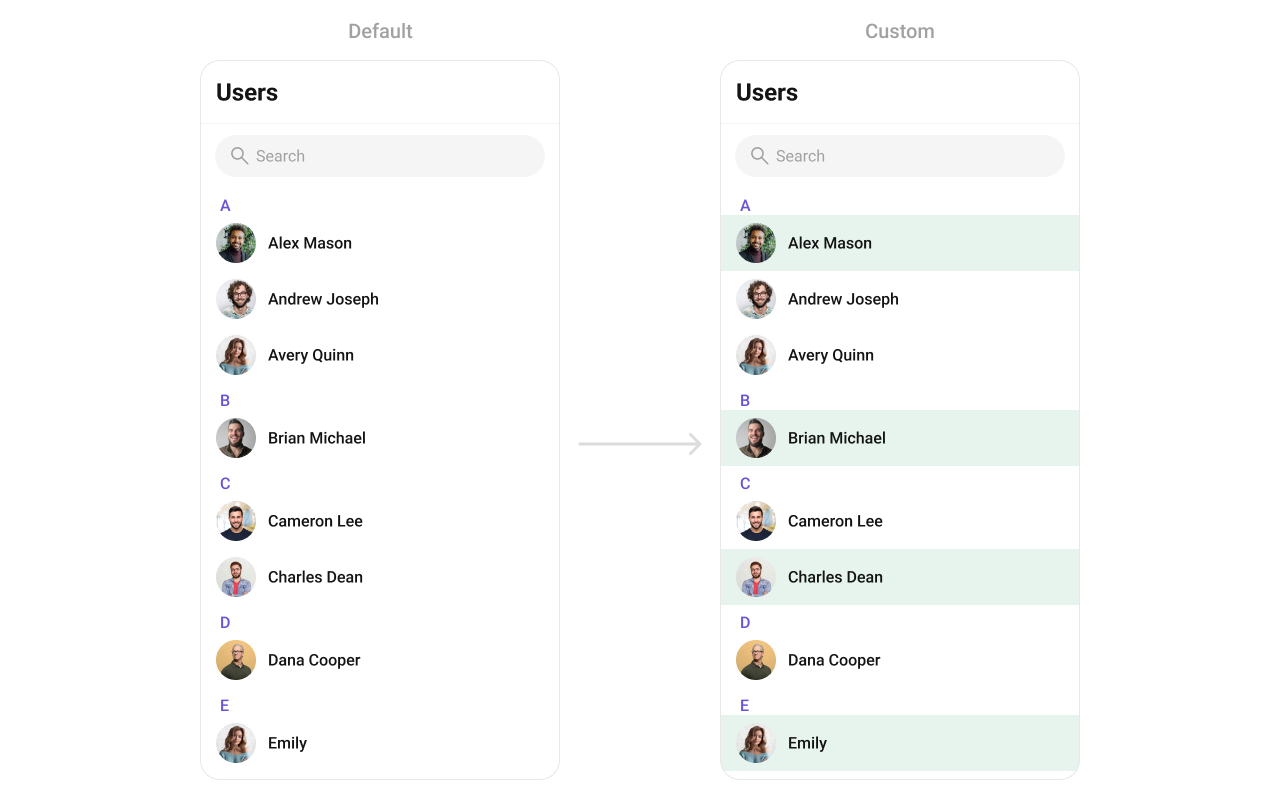
Widget getCustomUserListItem(User user, BuildContext context) {
  // Get status indicator
  StatusIndicatorUtils statusIndicatorUtils = StatusIndicatorUtils.getStatusIndicatorFromParams(
    context: context,
    user: user,
    onlineStatusIndicatorColor: Color(0xFF56E8A7),
  );

  return CometChatListItem(
    id: user.uid,
    avatarName: user.name,
    avatarURL: user.avatar,
    avatarHeight: 40,
    avatarWidth: 40,
    title: user.name,
    key: UniqueKey(),
    statusIndicatorColor: statusIndicatorUtils.statusIndicatorColor,
    statusIndicatorIcon: statusIndicatorUtils.icon,
    statusIndicatorStyle: CometChatStatusIndicatorStyle(
      border: Border.all(width: 2, color: Color(0xFFFFFFFF)),
      backgroundColor: Color(0xFF56E8A7),
    ),
    hideSeparator: true,
    style: ListItemStyle(
      background: user.status == CometChatUserStatus.online
          ? const Color(0xFFE6F4ED)
          : Colors.transparent,
      titleStyle: TextStyle(
        overflow: TextOverflow.ellipsis,
        fontSize: 16,
        fontWeight: FontWeight.w500,
        color: Color(0xFF141414),
      ),
      padding: EdgeInsets.only(left: 16, right: 16, top: 8, bottom: 8),
    ),
  );
}

// Usage:
CometChatUsers(
  listItemView: (user) => getCustomUserListItem(user, context),
)

leadingView

Replace the avatar / left section.
CometChatUsers(
  leadingView: (context, user) {
    return Container(
      decoration: BoxDecoration(
        border: Border.all(
          color: user.status == CometChatUserStatus.online 
              ? Color(0xFF09C26F) 
              : Colors.transparent,
          width: 2,
        ),
        borderRadius: BorderRadius.circular(8),
      ),
      child: CometChatAvatar(
        image: user.avatar,
        name: user.name,
        style: CometChatAvatarStyle(
          borderRadius: BorderRadius.circular(6),
        ),
      ),
    );
  },
)

titleView

Replace the name / title text. Role badge inline example.
CometChatUsers(
  titleView: (context, user) {
    return Row(
      children: [
        Text(
          user.name ?? "",
          style: TextStyle(fontWeight: FontWeight.w500, fontSize: 16),
        ),
        if (user.role != null)
          Container(
            margin: EdgeInsets.only(left: 4),
            padding: EdgeInsets.symmetric(horizontal: 6, vertical: 2),
            decoration: BoxDecoration(
              color: Color(0xFF09C26F),
              borderRadius: BorderRadius.circular(7),
            ),
            child: Text(
              user.role!,
              style: TextStyle(color: Colors.white, fontSize: 8, fontWeight: FontWeight.w600),
            ),
          ),
      ],
    );
  },
)

subtitleView

Replace the subtitle text for each user.
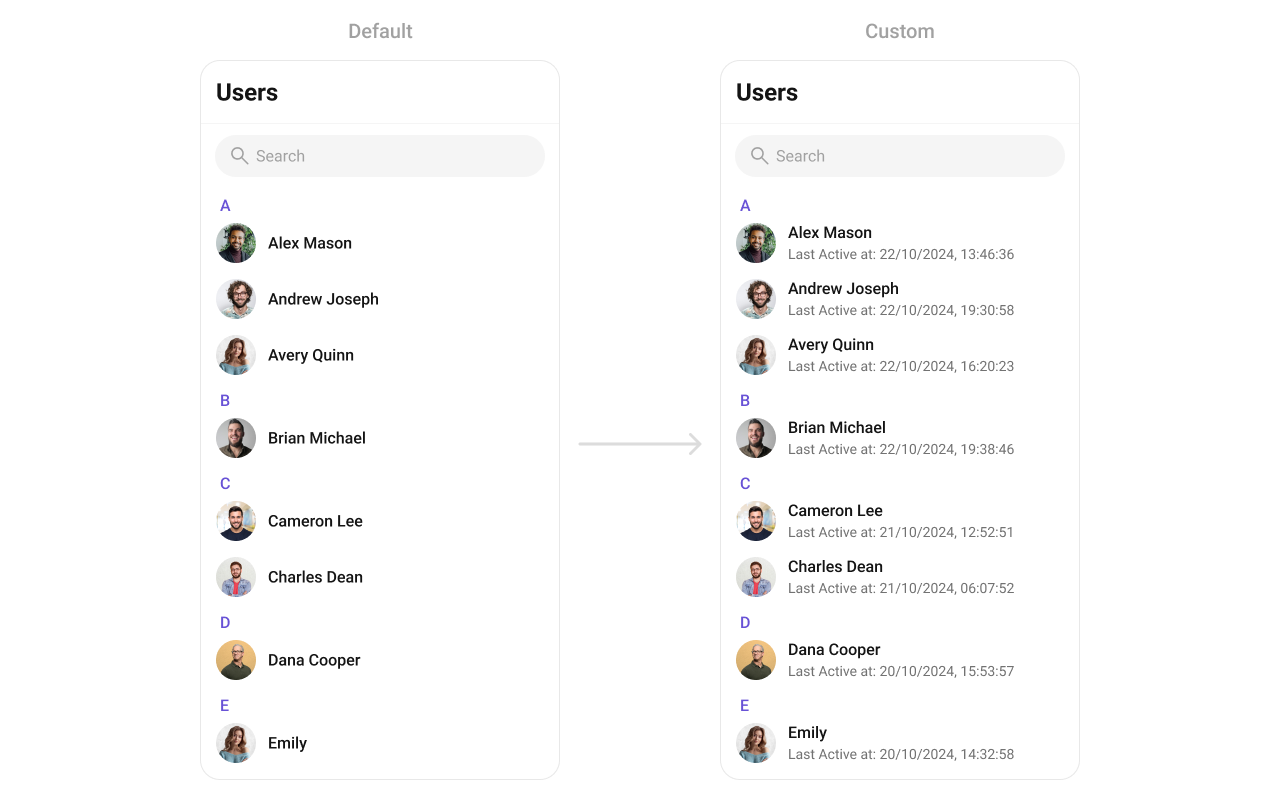
CometChatUsers(
  subtitleView: (context, user) {
    final dateTime = user.lastActiveAt ?? DateTime.now();
    final subtitle = "Last Active at ${DateFormat('dd/MM/yyyy, HH:mm:ss').format(dateTime)}";
    
    return Text(
      subtitle,
      style: TextStyle(
        color: Color(0xFF727272),
        fontSize: 14,
        fontWeight: FontWeight.w400,
      ),
    );
  },
)

trailingView

Replace the right section. Custom tag badge example.
CometChatUsers(
  trailingView: (context, user) {
    final tag = user.tags?.isNotEmpty == true ? user.tags!.first : null;
    if (tag == null) return null;
    
    return Container(
      padding: EdgeInsets.symmetric(horizontal: 6, vertical: 4),
      decoration: BoxDecoration(
        color: Color(0xFF6852D6),
        borderRadius: BorderRadius.circular(4),
      ),
      child: Text(
        tag,
        style: TextStyle(color: Colors.white, fontSize: 10, fontWeight: FontWeight.w600),
      ),
    );
  },
)

setOptions

Replace the context menu / long-press actions on each user item.
CometChatUsers(
  setOptions: (user, controller, context) {
    return [
      CometChatOption(
        id: "block",
        title: "Block User",
        icon: AssetConstants.close,
        onClick: () {
          CometChat.blockUsers([user.uid], onSuccess: (users) {
            print("User blocked");
          }, onError: (error) {
            print("Error: $error");
          });
        },
      ),
      CometChatOption(
        id: "view_profile",
        title: "View Profile",
        iconWidget: Icon(Icons.person_outline),
        onClick: () {
          // Navigate to user profile
        },
      ),
    ];
  },
)

addOptions

Add to the existing context menu actions without removing defaults.
CometChatUsers(
  addOptions: (user, controller, context) {
    return [
      CometChatOption(
        id: "add_friend",
        title: "Add Friend",
        iconWidget: Icon(Icons.person_add_outlined),
        onClick: () {
          // Add friend logic
        },
      ),
      CometChatOption(
        id: "send_message",
        title: "Send Message",
        iconWidget: Icon(Icons.message_outlined),
        onClick: () {
          // Navigate to messages
        },
      ),
    ];
  },
)

appBarOptions

Add custom widgets to the app bar.
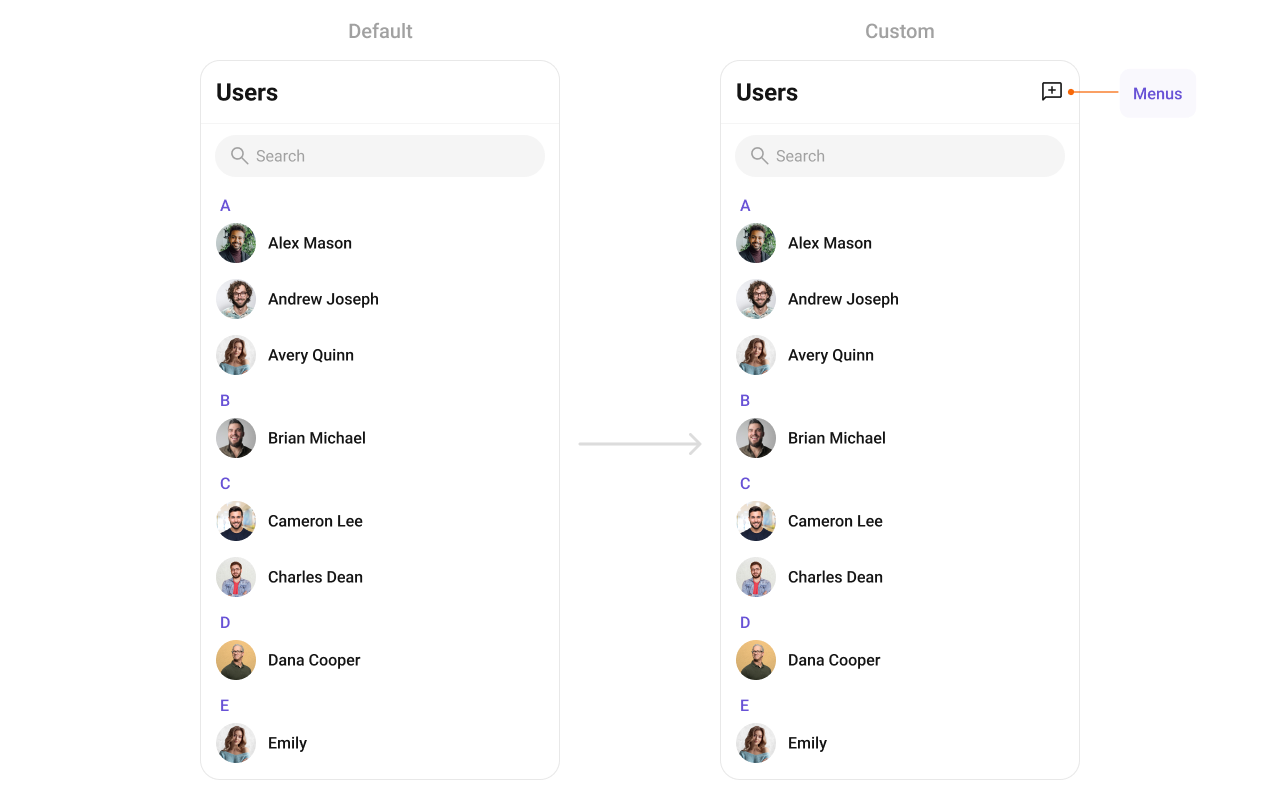
CometChatUsers(
  appBarOptions: (context) => [
    IconButton(
      onPressed: () {
        // Handle action
      },
      icon: Icon(Icons.add_comment_outlined, color: Color(0xFF141414)),
    ),
  ],
)
For a more complete popup menu with styling:
CometChatUsers(
  appBarOptions: (context) => [
    PopupMenuButton(
      shape: RoundedRectangleBorder(
        borderRadius: BorderRadius.circular(8),
        side: BorderSide(color: Color(0xFFF5F5F5), width: 1),
      ),
      color: Colors.white,
      elevation: 4,
      icon: Icon(Icons.more_vert, color: Color(0xFF141414)),
      onSelected: (value) {
        switch (value) {
          case 'refresh':
            // Refresh users list
            break;
          case 'settings':
            // Navigate to settings
            break;
        }
      },
      itemBuilder: (BuildContext context) => [
        PopupMenuItem(
          value: 'refresh',
          child: Row(
            children: [
              Icon(Icons.refresh, color: Color(0xFFA1A1A1)),
              SizedBox(width: 8),
              Text("Refresh"),
            ],
          ),
        ),
        PopupMenuItem(
          value: 'settings',
          child: Row(
            children: [
              Icon(Icons.settings, color: Color(0xFFA1A1A1)),
              SizedBox(width: 8),
              Text("Settings"),
            ],
          ),
        ),
      ],
    ),
  ],
)

Styling

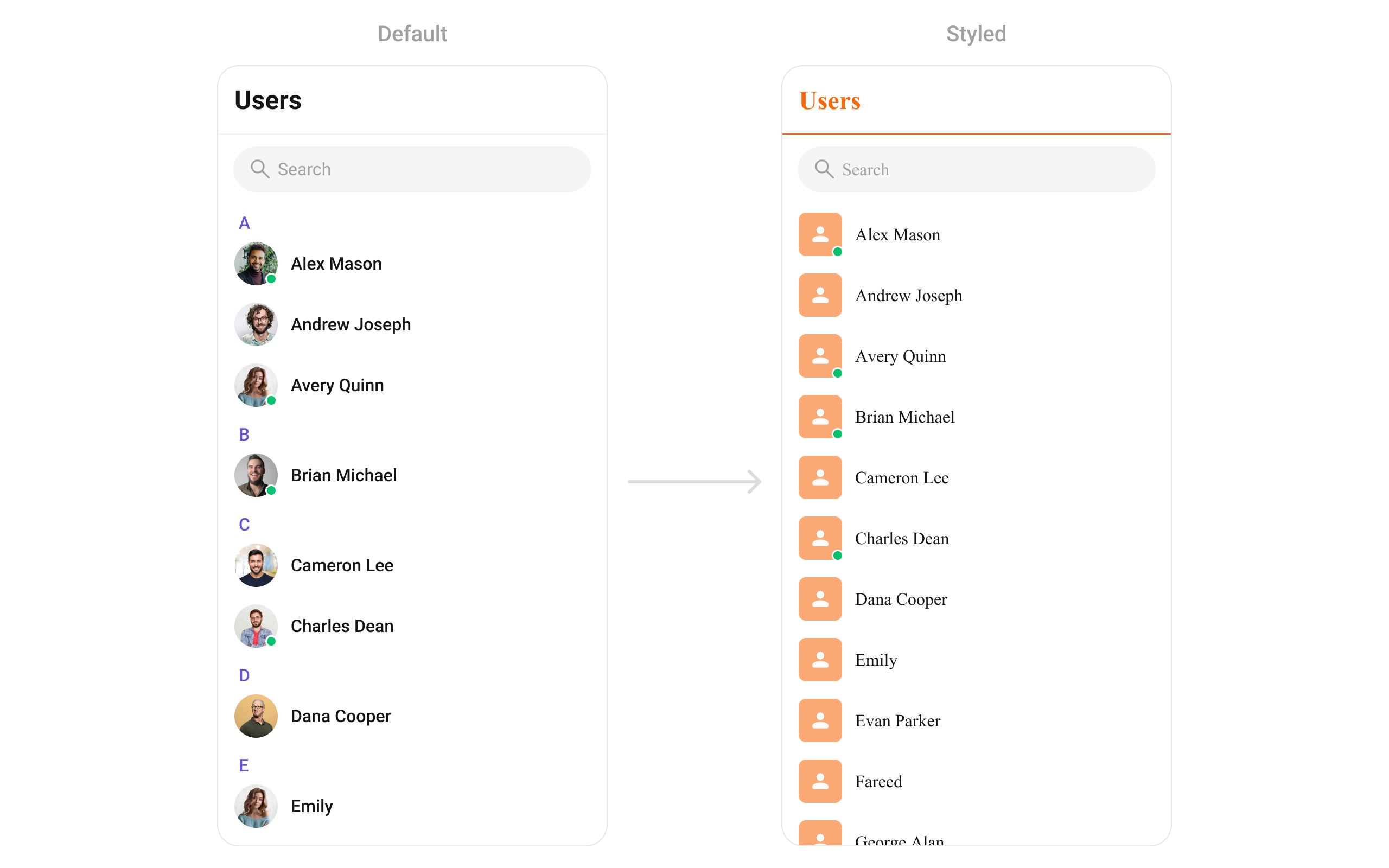
Set CometChatUsersStyle to customize the appearance.
CometChatUsers(
  usersStyle: CometChatUsersStyle(
    backgroundColor: Colors.white,
    titleTextColor: Color(0xFFF76808),
    separatorColor: Color(0xFFF76808),
    avatarStyle: CometChatAvatarStyle(
      borderRadius: BorderRadius.circular(8),
      backgroundColor: Color(0xFFFBAA75),
    ),
  ),
)

Style Properties

PropertyTypeDescription
backgroundColorColor?Background color of the component
borderBorder?Border for the widget
borderRadiusBorderRadiusGeometry?Border radius for the widget
titleTextColorColor?Color of the header title
titleTextStyleTextStyle?Style for the header title
backIconColorColor?Back button icon color
searchBackgroundColorColor?Background color of search box
searchBorderBorderSide?Border for search box
searchBorderRadiusBorderRadius?Border radius for search box
searchPlaceHolderTextColorColor?Placeholder text color in search
searchPlaceHolderTextStyleTextStyle?Placeholder text style in search
searchIconColorColor?Search icon color
searchInputTextColorColor?Search input text color
searchInputTextStyleTextStyle?Search input text style
separatorColorColor?Color of list item separators
separatorHeightdouble?Height of list item separators
stickyTitleColorColor?Color of sticky alphabetical headers
stickyTitleTextStyleTextStyle?Style for sticky alphabetical headers
itemTitleTextColorColor?Color of user name in list items
itemTitleTextStyleTextStyle?Style for user name in list items
itemBorderBoxBorder?Border for list items
listItemSelectedBackgroundColorColor?Background color for selected items
emptyStateTextColorColor?Text color for empty state title
emptyStateTextStyleTextStyle?Text style for empty state title
emptyStateSubTitleTextColorColor?Text color for empty state subtitle
emptyStateSubTitleTextStyleTextStyle?Text style for empty state subtitle
errorStateTextColorColor?Text color for error state title
errorStateTextStyleTextStyle?Text style for error state title
errorStateSubTitleTextColorColor?Text color for error state subtitle
errorStateSubTitleTextStyleTextStyle?Text style for error state subtitle
retryButtonBackgroundColorColor?Background color for retry button
retryButtonBorderRadiusBorderRadiusGeometry?Border radius for retry button
retryButtonBorderBorderSide?Border for retry button
retryButtonTextColorColor?Text color for retry button
retryButtonTextStyleTextStyle?Text style for retry button
submitIconColorColor?Color of submit icon in selection mode
checkBoxBackgroundColorColor?Background color of unchecked checkbox
checkBoxCheckedBackgroundColorColor?Background color of checked checkbox
checkboxSelectedIconColorColor?Color of checkmark icon
checkBoxBorderRadiusBorderRadiusGeometry?Border radius for checkbox
checkBoxBorderBorderSide?Border for checkbox
avatarStyleCometChatAvatarStyle?Style for user avatars
statusIndicatorStyleCometChatStatusIndicatorStyle?Style for status indicators

Common Patterns

Custom empty state with CTA

CometChatUsers(
  emptyStateView: (context) {
    return Center(
      child: Column(
        mainAxisAlignment: MainAxisAlignment.center,
        children: [
          Icon(Icons.people_outline, size: 64, color: Color(0xFF727272)),
          SizedBox(height: 16),
          Text("No users found", style: TextStyle(fontSize: 18, fontWeight: FontWeight.w500)),
          SizedBox(height: 8),
          ElevatedButton(
            onPressed: () {
              // Invite users
            },
            child: Text("Invite Users"),
          ),
        ],
      ),
    );
  },
)

Friends-only list

CometChatUsers(
  usersRequestBuilder: UsersRequestBuilder()
    ..friendsOnly = true
    ..limit = 15,
)

Multi-select with selection callback

CometChatUsers(
  selectionMode: SelectionMode.multiple,
  activateSelection: ActivateSelection.onClick,
  onSelection: (selectedUsers, context) {
    if (selectedUsers != null && selectedUsers.isNotEmpty) {
      print("Selected ${selectedUsers.length} users");
      // Create group with selected users, etc.
    }
  },
)

Hide all chrome — minimal list

CometChatUsers(
  hideSearch: true,
  hideAppbar: true,
  usersStatusVisibility: false,
  stickyHeaderVisibility: true, // hides alphabetical headers
)

Online users only

CometChatUsers(
  usersRequestBuilder: UsersRequestBuilder()
    ..userStatus = CometChatUserStatus.online,
)

Accessibility

The component renders a scrollable list of interactive items. Each user row supports:
  • Tap gesture for selection/navigation
  • Long-press gesture for context menu actions
  • Checkbox selection in multi-select mode with proper touch targets
  • Status indicators with visual feedback for online/offline state
For screen readers:
  • User names are readable as list item titles
  • Status indicators use color coding — consider adding Semantics widgets via leadingView if screen reader descriptions are needed for these visual indicators
  • Selection state is communicated through checkbox widgets
The component respects system accessibility settings including text scaling and high contrast modes.

Props

All props are optional unless noted.

activateSelection

Controls when selection mode activates.
TypeActivateSelection?
Defaultnull
Values: ActivateSelection.onClick, ActivateSelection.onLongClick

addOptions

Adds additional context menu actions to the default options.
TypeList<CometChatOption>? Function(User, CometChatUsersController, BuildContext)?
Defaultnull

appBarOptions

Custom widgets to display in the app bar.
TypeList<Widget> Function(BuildContext context)?
Defaultnull

backButton

Custom back button widget.
TypeWidget?
DefaultBuilt-in back arrow

controllerTag

Identifier tag for controller management.
TypeString?
Defaultnull

emptyStateView

Custom view displayed when there are no users.
TypeWidgetBuilder?
DefaultBuilt-in empty state

errorStateView

Custom view displayed when an error occurs.
TypeWidgetBuilder?
DefaultBuilt-in error state

height

Height of the widget.
Typedouble?
Defaultnull

hideAppbar

Hides the app bar including title and search.
Typebool?
Defaultfalse

hideSearch

Hides the search input box.
Typebool
Defaultfalse

leadingView

Custom renderer for the avatar / left section.
TypeWidget? Function(BuildContext context, User user)?
DefaultBuilt-in avatar

listItemView

Custom renderer for the entire list item row.
TypeWidget Function(User user)?
DefaultBuilt-in list item

loadingStateView

Custom view displayed during loading state.
TypeWidgetBuilder?
DefaultBuilt-in shimmer

onBack

Callback triggered when the back button is pressed.
TypeVoidCallback?
Defaultnull

onEmpty

Callback triggered when the user list is empty.
TypeOnEmpty?
Defaultnull

onError

Callback triggered when an error occurs.
TypeOnError?
Defaultnull

onItemLongPress

Callback triggered on long press of a user item.
TypeFunction(BuildContext context, User user)?
Defaultnull

onItemTap

Callback triggered when tapping a user item.
TypeFunction(BuildContext context, User user)?
Defaultnull

onLoad

Callback triggered when the list is successfully loaded.
TypeOnLoad<User>?
Defaultnull

onSelection

Callback triggered when users are selected. Requires selectionMode to be set.
TypeFunction(List<User>? list, BuildContext context)?
Defaultnull

scrollController

Controller for scrolling the list.
TypeScrollController?
Defaultnull

searchBoxIcon

Custom search box icon widget.
TypeWidget?
DefaultBuilt-in search icon

searchKeyword

Pre-fills the search and filters the user list.
TypeString?
Defaultnull

searchPlaceholder

Placeholder text for the search input box.
TypeString?
Defaultnull

selectionMode

Enables single or multi-select mode.
TypeSelectionMode?
Defaultnull
Values: SelectionMode.single, SelectionMode.multiple, SelectionMode.none

setOptions

Replaces the default context menu actions.
TypeList<CometChatOption>? Function(User, CometChatUsersController, BuildContext)?
Defaultnull

showBackButton

Shows or hides the back button.
Typebool
Defaulttrue

stickyHeaderVisibility

Hides alphabetical section headers when set to true.
Typebool?
Defaultfalse
Note: When false, alphabetical headers (A, B, C…) are shown to separate users.

submitIcon

Custom submit icon widget for selection mode.
TypeWidget?
DefaultBuilt-in check icon

subtitleView

Custom renderer for the subtitle text.
TypeWidget? Function(BuildContext context, User user)?
Defaultnull

title

Title text displayed in the app bar.
TypeString?
Default"Users"

titleView

Custom renderer for the name / title text.
TypeWidget? Function(BuildContext context, User user)?
DefaultBuilt-in title

trailingView

Custom renderer for the right section.
TypeWidget? Function(BuildContext context, User user)?
Defaultnull

usersProtocol

Custom protocol for fetching users.
TypeUsersBuilderProtocol?
Defaultnull

usersRequestBuilder

Controls which users load and in what order.
TypeUsersRequestBuilder?
DefaultSDK default (30 per page)
Pass the builder instance, not the result of .build().

usersStatusVisibility

Shows or hides the online/offline status indicator on user avatars.
Typebool?
Defaulttrue

usersStyle

Styling options for the users list.
TypeCometChatUsersStyle
DefaultCometChatUsersStyle()

width

Width of the widget.
Typedouble?
Defaultnull

Events

CometChatUsers does not emit custom UI events. It subscribes to:
EventPayloadInternal behavior
CometChatUserEvents.ccUserBlockedUserUpdates blocked user in list
CometChatUserEvents.ccUserUnblockedUserUpdates unblocked user in list

Customization Matrix

What to changeWhereProperty/APIExample
Override behavior on user interactionComponent propson<Event> callbacksonItemTap: (ctx, user) => setActive(user)
Filter which users appearComponent propsusersRequestBuilderusersRequestBuilder: UsersRequestBuilder()..friendsOnly = true
Toggle visibility of UI elementsComponent propshide<Feature> / show<Feature> boolean propshideSearch: true
Replace a section of the list itemComponent props<slot>View render propslistItemView: (user) => CustomWidget()
Change colors, fonts, spacingComponent propsusersStyleusersStyle: CometChatUsersStyle(titleTextColor: Colors.red)