FieldValue
Packagecometchat_chat_uikit
FrameworkFlutter
ComponentsCometChatMessageHeader, CometChatMessageList, CometChatMessageComposer
LayoutSingle chat window — no conversation list
PrerequisiteComplete Getting Started Steps 1–4 first
PatternSupport chat, embedded widgets, focused messaging
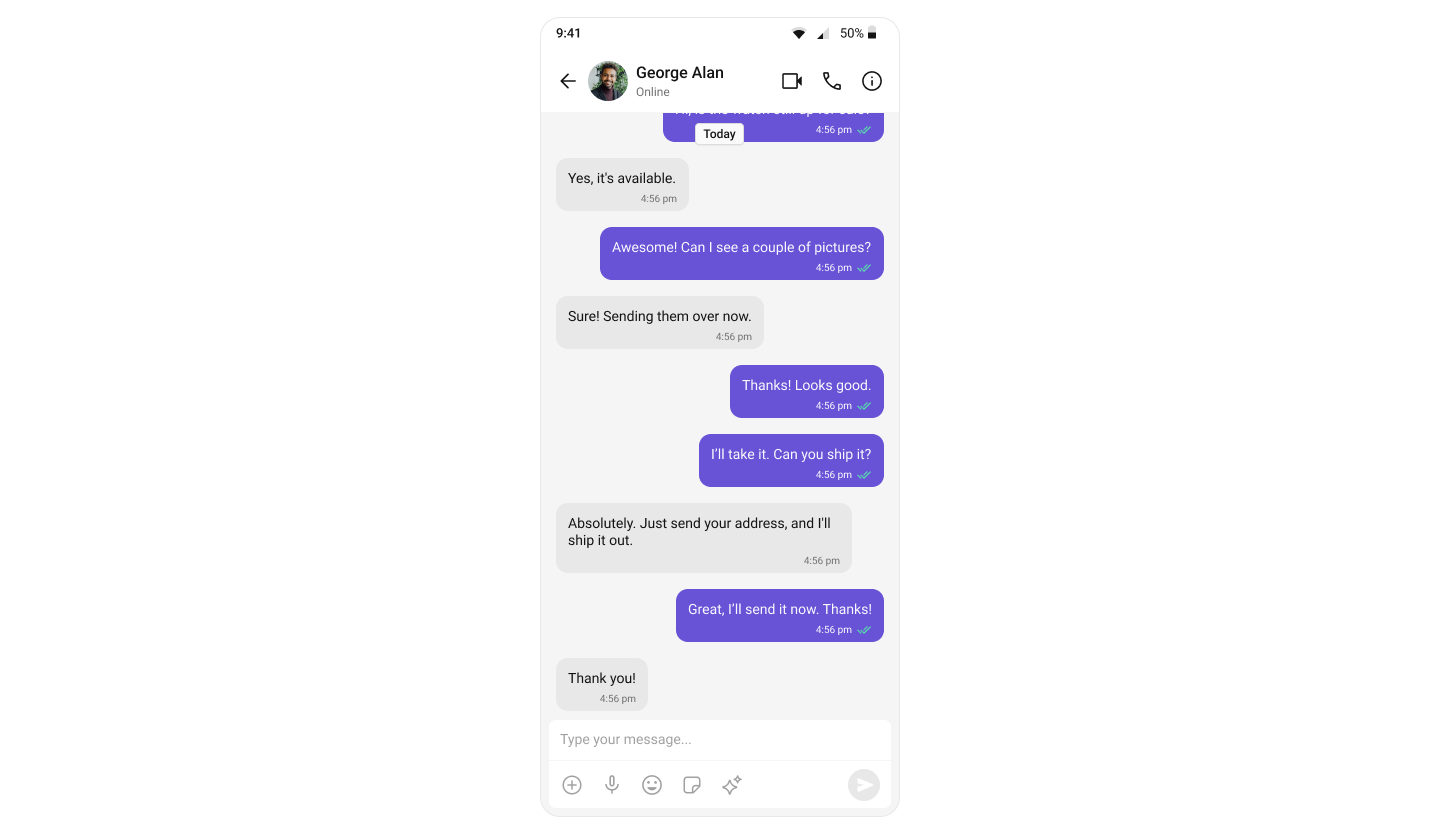
This guide builds a single chat window — no conversation list. Users go directly into a one-to-one or group chat. Good for support chat, deep links, or focused messaging. This assumes you’ve already completed Getting Started (project created, UI Kit installed, init + login working).
View Sample App on GitHub

What You’re Building

Three components stacked vertically:
  1. Chat header — displays recipient name, avatar, and call buttons
  2. Message list — real-time chat history
  3. Message composer — text input with media and emojis

Step 1 — Create the Chat Screen

The app fetches a user on mount and renders the message components.
lib/chat_screen.dart
import 'dart:async';
import 'package:flutter/material.dart';
import 'package:cometchat_chat_uikit/cometchat_chat_uikit.dart';

class ChatScreen extends StatelessWidget {
  const ChatScreen({super.key});

  Future<User> fetchUser(String uid) async {
    final completer = Completer<User>();
    CometChat.getUser(
      uid,
      onSuccess: (user) => completer.complete(user),
      onError: (error) => completer.completeError(error),
    );
    return completer.future;
  }

  @override
  Widget build(BuildContext context) {
    return FutureBuilder<User>(
      future: fetchUser("cometchat-uid-2"),  // Replace with target UID
      builder: (context, snapshot) {
        if (snapshot.connectionState == ConnectionState.waiting) {
          return const Scaffold(
            body: Center(child: CircularProgressIndicator()),
          );
        }
        if (snapshot.hasError) {
          return Scaffold(
            body: Center(child: Text('Error: ${snapshot.error}')),
          );
        }
        final user = snapshot.data!;
        return Scaffold(
          appBar: CometChatMessageHeader(user: user),
          body: SafeArea(
            child: Column(
              children: [
                Expanded(child: CometChatMessageList(user: user)),
                CometChatMessageComposer(user: user),
              ],
            ),
          ),
        );
      },
    );
  }
}
Key points:
  • CometChat.getUser(uid) fetches the user object — you need a real user object, not a manually constructed one.
  • Pass either user or group to the message components, never both.

Switching to Group Chat

To load a group chat instead, use CometChat.getGroup():
Future<Group> fetchGroup(String guid) async {
  final completer = Completer<Group>();
  CometChat.getGroup(
    guid,
    onSuccess: (group) => completer.complete(group),
    onError: (error) => completer.completeError(error),
  );
  return completer.future;
}

// Then in build():
FutureBuilder<Group>(
  future: fetchGroup("your-group-guid"),
  builder: (context, snapshot) {
    if (snapshot.hasData) {
      final group = snapshot.data!;
      return Scaffold(
        appBar: CometChatMessageHeader(group: group),
        body: Column(
          children: [
            Expanded(child: CometChatMessageList(group: group)),
            CometChatMessageComposer(group: group),
          ],
        ),
      );
    }
    return const CircularProgressIndicator();
  },
)

Step 2 — Run the App

flutter run
You should see the chat window load with the conversation for the UID you set.

Next Steps